Design and print your own labels for jam and jelly

I’ve wanted to print our own jar labels for ages. Ever since I saw a cupboard full of beautifully labelled preserves in a client’s house. It’s the old problem of finding the time to buy, design and print the labels.
A month or so ago I whizzed down to Newmarket to buy some labels for our chutney. I’ve been buying them from one of those shops that sells absolutely everything and consequently good fun to visit. They run out of these labels pretty fast so I was delighted when I spotted them on a rack. But I was horrified to see that they were £2.49 for twenty five labels. A few years ago when we made a handful of jellies and jams these labels would have been fine. Nowadays we make a lot of preserves it seemed crazy to spend 10 pence on each label. So I put them back. Danny would have been proud of me.
I decided it was time to print our own labels and had a nose around the stationary shops in town. Avery makes sheets of address labels that are printer friendly and W H Smith have their own version, slightly cheaper. At around £6.99 for 840 they’re a bargain. The labels look quite small but actually offer about the same amount of space as the pretty labels in the kitchen shop.
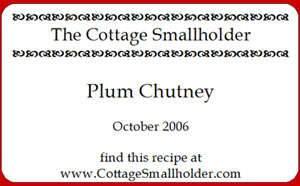
When I got home I trawled the Internet for label designing software. I discovered that Avery offer free software to design the layout of your labels. You create a Master and can print an entire sheet or just one or two labels. This is handy if you only have a few jars. The software also works well with the WH Smith labels. To download Avery Design Pro5 lite, click here http://www.avery.co.uk/uk1/downloads/designpro5_basic.jsp . This version doesn’t have the clip art and features of the full version that costs £25 but it’s a good basic package. The label above is a screen shot from the Avery screen. The actual labels are sharper than this.
I wanted an old fashioned look for our labels so searched the internet for royalty free fonts. One of the best sites is here http://desktoppub.about.com/od/oldfonts/ It’s packed with unusual fonts, not really suitable for us unless we start putting something more ghoulish than jam in our jars. If you have children over six you might like to check the site out for great fonts for spooky Halloween messages.
Just before Christmas I noticed that the a great foody blog has gorgeous Christmas pressie labels to download http://www.deliciousdays.com/archives/2006/12/13/tag-your-gifts/. The author of this blog also makes pretty tie on labels for her preserves.
Tricks and tips:
-
If you download fonts from the internet they are usually in a zip file format. Download the font to your desktop so it will be easy to find. Double click on the icon and this will automatically open up the zip programme. Move the file to your font folder which should be C:\ WINDOWS\fonts.
-
If you are going to put the sheets of labels through the printer several times, Avery labels are the beefier option.

Comments(52)
Cutting energy costs
Recipe for sausages baked with herby garlic infused beans, bacon and tomato
Tracing some of my ancestors has taken me on a long journey
Recipe for lamb shanks braised in red wine with shallots: slow cooker/crockpot
The cupboard was bare – so what was The Contessa going to eat last night?
Recipe for slow cooked ox cheeks braised in herbs and beer: slow cooker/crock pot casserole
downloaded and ready for the next batch of jars! another place to look is ‘word office’. just open new doc, click ‘tools’, envelopes/labels, full page of ‘same’, (options for labels size, on box). it should be possible to insert clip art, but i haven’t managed to do it as of yet. try it, good luck!
Been working at the labels and made a good batch with the avery lite program. Even worked out how to drag photos from file to file and now have some with preserve name AND a photo of where the ingredients were grown. Ah! technology and oldtimers, born to be together….? Thanks for the link. Now all that remains is to remove loads of old handwritten labels to be replaced by slightly more designer ones!
Just a hint – to remove old labels from jars.
Nail varnish remover on a cotton wool pad works wonders, then give a good wash with soapy water, or if the jar is empty put through the dishwasher.
Amber
Great tip, Amber, thanks very much for sharing!
Thanks Amber, the facility I really like on this software is the ability to regulate the number of labels that you want to print at once, For those not “savvy”, when you have completed your label, you will have Master label and label 1 tags. Right Click “Label 1″ and click “copy label” and Label 2 will appear alongside – repeat for label 3 etc. When you print preview. you will see that the number of lablels will be printed on one print run (unlike using word which necessitates single print function every time.
Hi Howard,
The software makes label printing easy and it’s free!
what a great ides. we will try this too. yes it is very easy to do.
Hi Eileen
Home printed labels are fun to make and add the finishing touch to a jar of preserves.
Hi there,
A while back I got a great deal on some plain labels from a british labels company. I haven’t needed to buy any for a few years so was just wondering where you get your labels from? I will probably go back and use the same company again as they did me such a great offer on their plain labels as the company was so efficient last time.
Hi TheBlueGoldfish
We use a wole range of labels. Mainly Avery. D says that Mercian are very good.
Thanks for dropping by.
Thanks for the tip on the free Avery label application. I’ve just made my first batch of homemade jam & have been looking for nice but inexpensive labels. This application will be perfect!
Hi Kate
Delighted that we could help!
I was looking for printable jam labels this afternoon and found your very useful site. I downloaded this software and just finished my jam labels perfectly. You have a very interesting blog, I will add it to my favorites and will look around another time.
It’s great that you’ve taken the time and effort to share all this info, that obviously took you a long time to research. The usual generous spirit of The Cottage Smallholder shining through again – nice one!
Another tip for removing stubborn glue from old labels is a couple of drops of Eucalyptus oil on a cotton wool pad (or if I’ve run out – Olbas oil not quite so good but does do it). Smells nice too! x
I’m stuck
I have downloaded the Avery software but it doesn’t like any of the things I am trying to ‘insert’ to label. Keeps saying wrong format.
I have saved a few clip art files into a word doc and it wont let me insert those either.
Where did you start with your label designs please and what format have you saved your images in.
I have Avery labels J8160 (21 to a page)and need to design chutney and pickle type labels. I like Italic fonts and traditional designs.
Any advice much appreciated…..this is driving me barmy!
Hi Mary Anne
I’m using design pro lite. It imports jpeg files (rose.jpg)fine. You can save an image file in a simple art package in different formats. Try creating a new folder and saving your clip art to that folder , making sure that they are in jpg format. Pasting them into a word document is probably a mistake. There’s no problem using different fonts either.
I’m sorry but I dont know what is going wrong. Have you read the help/getting started section? I probably find it easy as I used to be involved in graphic design.
I’ll have another go at it tomorrow when hopefully my brain will be fresher. I have been saving various images to use for my labels but they are not all jpg’s – some are from clip art so I guess they don’t recognise them.
I just want a nice border around the label and an image which reflects whats in the jar! Last year I used an Avery template but it saved it as a pdf file and of course I cant update it. Have no idea how it saved it in that format. As you can see I am a complete novice when it comes to labels, and I do hate to be beaten.
Thanks for replying – much appreciated.
MA
Hi Mary Anne
If you saved it off as a pdf file all may not be lost. The pdf format generally saves things in layers. The border, the graphics the title etc as sepearte images within the same image.
If you can get hold of a copy of Adobe Photoshop you can open the image and see if it is saved in layers and extract the layer that you need. You may have saved it not in layers but it would be worth a go.
Hi,
Good old vinegar works well at removing labels and goo.
Paul
Hi what a wonderful web site full of info. just chanced apon you while searching jam labels!! I had a really stubborn sticky problem on one of my jars and eventually found that ammonia got it off very well. It is freely available here in France.
Next time I will try some of the other remedies suggested. I,m off for another browze around your site as we are trying to be more self sufficient and all help is greatly appreciated
To remove the spirit-based sticky labels that take forever to get off, try using ordinary paint thinners you can get in good-sized bottles. Much cheaper than nail polish remover, which seems to me to be a refined thinners. (Not to be confused with turps/ white spirit which won’t do the job.)
This is great, where did you get the patterns around the company name from?
Thanks!
Hi Oliver
It the Fleurons font – you can download it free from here http://www.searchfreefonts.com/free/fleurons.htm
Hi,
I cant seem to find that character in the font. Could it be anything else?
Thanks,
Oliver
Sorry Oliver
Discovered that it’s Wingdings2. A preinstalled windows font.
Sorry been browsing comments-found an article online ref removong labels. Put dry bottles in low oven for a while, then using an oven glove to hold HOT bottle peel label off. Doesn’t work for all labels! Any residual glue can be removed with white spirit.
Hi extownie
Thanks very much for this tip – removing labels can be such a palaver.
On the same principle of heating the glue to soften it, I once read somewhere about using a hairdryer on plasters so make them less painful to remove from your skin. This might be worth trying as it would be cheaper than turning on the oven if it wasn’t already on for something else, although possibly more time consuming!
Is there any software for producing labels using a mac?
Hi Barbara
Yes there is – Avery has software for PCs and macs
http://www.avery.com/avery/en_us/Templates-&-Software
i made my own but i did not like it after 3 hours
u know when your get happy when your think it is
that is what i thourght
best wishes
sarah holland
Thanks Fiona, I will try again.
Thanks for this – trying to make my homemade chutney look more appealing this year!! Almost at the end of our apple chutney from last year so attempting spiced rhubarb – tastes good so far – hopefully will develop like the apple did!
I too found a lack of labels, but wanted ones with pretty pictures, so this is what I did. I used my own photos of the tress/bushes involved, put them into a newsletter format where I can adjust their size (I have a Mac) , and reduced them to the size I thought I wanted – this was guesswork first time round. Then I printed the page out, cut out the pictures and glued them to sticky labels somewhat bigger. This gave room to write on them clearly. Maybe it’s possible to do the whole process on the computer but I can’t! For presents, I finished off with hand-printed cloth covers for the tops and fastened them with elastic bands and then ‘rustic’ string. They’re being very well received!
To remove the sticky residue on any container after the removal of the previous label you should use ….WD40,
It claimed is use on the tin and with enough on a paper towel it makes short work of that mess I assure you !!!
Give it a go, but remember to replace the one you take from the tool box because after you see what it can be used for you won’t put it back !!
Pat
In answer to Mo’s dilemma re. labels, I used Excel to cut and paste images to and made them whatever size I needed depending on size of bottle and used a full A4 size sticky label so I could cut to size. I have also used spare pieces of A4 card and made the net of a cuboid as a bottle holder and covered the card with an A4 label to customise for friends with photos of them included. I used images from Google to cut and paste on to cells and adjusted size of image accordingly.
I also had problems initially inserting clip-art into the Avery program (MaryAnn 2008) If you open them in Paint (installed automatically on most PCs), and then use the “save as” option to save them as a jpeg format, they import beautifully.
Just so happens I’ve designed a range of craft stamps for jam labels, so you can customise to your heart’s content! Hope you like them.
I have been trying to do labels – 14 on a sheet, which I know is possible from the avery site, which I have downloaded BUT although it looks perfect on the print preview, when I print its out of line and the printing is too far up the sheet. Any clues anyone?
You need to use an Avery template to ensure everything is in the right place. As noted in an earlier post (above), you can download these free from http://www.avery.com/avery/en_us/Templates-&-Software. You need to make sure you select the template that matches the specific labels you’re using (the code is printed at the top left of the sheet on the ones I use). Good luck!
Hi Martha
If I don’t use Avery labels, I print a sheet of labels on plain paper to see if they will “fit” the labels. If necessary I move the printing on the labels up or down a bit – you select the label and use the down and up arrow keys on the keyboard. Keep on printing on plain paper until you have a match. This seems to work for me
Hi all, it is much easier to use the “tools” envelopes and labels option in word, followed by new page, then it is really easy to type text and import images, you can select the avery code for your size of labels easily and you shouldn’t have any trouble at all!!
Im not sure if it will work the same but i use baby oil to remove plaster residue from my kids skin so that may remove the labels too
This is the most amazing website I’ve ever come across, you have thought of everything! Thank you so so so much! (PS, your apple chutney recipe went down a treat!)
“tools” envelopes and labels option in word – the only problem is that you can’t import images to the label even though it says you can! any tips – also I have own brand labels so you have to enter all the sizes but that works too!
I have downloaded and used really easy to use, down side my loved so clled family laughed at me for labelling my homemade produce so professionally, to which I answered I dont see any of you laughing when your shoving it your face!! which I then received huge hugs “only playing with you mum” mmmmmm panic that I would stop home making me thinks!!!!!
Avery DP Lite is by far the best and most versatile label maker IMHO. Compared to the MS Word Label function it is so much more easy to do the fancy things that make your labels look professional (which to all intents they are)
Picking up on a couple of points above, if using Avery DP Lite Martha should probably try to calibrate her printer, (File>Calibrate printer. But in any case, using 70gsm cheap paper as a test run is always less wasteful than trashing sheet after sheet of labels.
We have used Photo glossy blank Labels (from stevestickers on ebay for wedding favours. (These are expensive, but give brilliant results) White glossy is good for labels on preserves.
Just as a final boost for Avery pro, it is also possible to link your address list (convert from excel worksheet) and make all your own Christmas address labels.
Don’t forget that if you press the option button on the Print driver page you can choose which label to start printing from – so you can use part sheets of labels.
Apologies for the long post & no I don’t work for Avery. Seasons greetings to all – Love the site.
Hi, I’ve been creating a little website that designs jam labels for you. They aren’t designed for Avery labels at this stage. But you can print them out on your home printer onto normal paper, then just paint the back with a little milk and stick them onto the glass jar. Try it out and let me know what you think.
http://www.jamlabelizer.com
That’s a pretty cool site, Andy. Your label designs look “tasty”.
Thanks for letting us know about it.
What a great idea, Andy! I really like it, but I think I should tell you that it’s completely broken in Opera/Mac. When I type into any of the fields, each letter appears twice. So instead of “sweet pepper” on my label, I got sswweeeett ppeeppppeerr. I tried it in Firefox and it worked OK.
thank you so much for this linky to labels. I have jars of chutney in my cupboard all set for gifting, but without labels! Today, this is my mission
Hi Andy, thanks so much for sharing your labels. Great idea about the milk to stick them on the jars. Just one problem..how do you edit the Fancy letter “S” (for Sarah) in the first label?