Design and print your own labels for jam and jelly
Posted by Fiona Nevile in Basics, Chutney and Pickles | 56 comments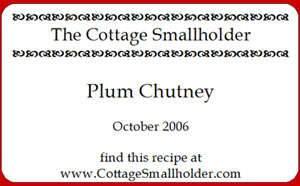
Printing your own labels for preserves is easy and fun
I’ve wanted to print our own jar labels for ages. Ever since I saw a cupboard full of beautifully labelled preserves in a client’s house. It’s the old problem of finding the time to buy, design and print the labels.
A month or so ago I whizzed down to Newmarket to buy some labels for our chutney. I’ve been buying them from one of those shops that sells absolutely everything and consequently good fun to visit. They run out of these labels pretty fast so I was delighted when I spotted them on a rack.
But I was horrified to see that they were £2.49 for 25 labels. A few years ago when we made a handful of jellies and jams these labels would have been fine. Nowadays we make a lot of preserves it seemed crazy to spend 10 pence on each label. So I put them back. Danny would have been proud of me.
I decided it was time to print our own labels and had a nose around the stationary shops in town. Avery makes sheets of address labels that are printer friendly and W H Smith have their own version, slightly cheaper. At around £6.99 for 840 they’re a bargain. The labels look quite small but actually offer about the same amount of space as the pretty labels in the kitchen shop.
When I got home I trawled the Internet for label designing software. I discovered that Avery offer free software to design the layout of your labels. You create a Master and can print an entire sheet or just one or two labels. This is handy if you only have a few jars. The software also works well with the WH Smith labels. To download free Avery templates, click here Free Avery Label Templates | Avery
This version doesn’t have the clip art and features of the full version that costs £25 but it’s a good basic package. The label above is a screen shot from the Avery screen. The actual labels are sharper than this.
I wanted an old fashioned look for our labels so searched the internet for royalty free fonts. One of the best sites is here http://desktoppub.about.com/od/oldfonts/ It’s packed with unusual fonts, not really suitable for us unless we start putting something more ghoulish than jam in our jars. If you have children over six you might like to check the site out for great fonts for spooky Halloween messages.
Just before Christmas I noticed that that a great foodie blog has gorgeous Christmas pressie labels to download http://www.deliciousdays.com/archives/2006/12/13/tag-your-gifts/. The author of this blog also makes pretty tie on labels for her preserves.
Tricks and tips:
- If you download fonts from the internet they are usually in a zip file format. Download the font to your desktop so it will be easy to find. Double click on the icon and this will automatically open up the zip programme. Move the file to your font folder which should be C:\ WINDOWS\fonts.
- If you are going to put the sheets of labels through the printer several times, Avery labels are the beefier option.
Leave a reply






Hi Barbara
Yes there is – Avery has software for PCs and macs
http://www.avery.com/avery/en_us/Templates-&-Software
Is there any software for producing labels using a mac?
On the same principle of heating the glue to soften it, I once read somewhere about using a hairdryer on plasters so make them less painful to remove from your skin. This might be worth trying as it would be cheaper than turning on the oven if it wasn’t already on for something else, although possibly more time consuming!
Hi extownie
Thanks very much for this tip – removing labels can be such a palaver.
Sorry been browsing comments-found an article online ref removong labels. Put dry bottles in low oven for a while, then using an oven glove to hold HOT bottle peel label off. Doesn’t work for all labels! Any residual glue can be removed with white spirit.
Sorry Oliver
Discovered that it’s Wingdings2. A preinstalled windows font.
Hi,
I cant seem to find that character in the font. Could it be anything else?
Thanks,
Oliver
Hi Oliver
It the Fleurons font – you can download it free from here http://www.searchfreefonts.com/free/fleurons.htm
This is great, where did you get the patterns around the company name from?
Thanks!
To remove the spirit-based sticky labels that take forever to get off, try using ordinary paint thinners you can get in good-sized bottles. Much cheaper than nail polish remover, which seems to me to be a refined thinners. (Not to be confused with turps/ white spirit which won’t do the job.)